Back to home

Changelog

Latest updates and improvements to Supalytics.

Date Filters for Events Command

The CLI events command now supports explicit date range filtering.

  • Use --start and --end to specify a date range
  • Works with event listing, property exploration, and breakdowns
  • Consistent with other CLI commands like query, pages, and referrers

Funnels in CLI

Full funnel management is now available in the CLI.

  • supalytics funnels to list all your funnels
  • supalytics funnels <id> to view funnel details with conversion analysis
  • supalytics funnels create to create new funnels with step definitions
  • supalytics funnels update to modify existing funnels
  • Supports page matches, custom events, and revenue events as funnel steps

Mid-Session Referrer Changes

The visitor journey timeline now shows when someone returns to your site from a different source mid-session.

  • Displays "returned via [source]" when a visitor comes back through a new referrer
  • Helps understand multi-touch attribution and how visitors discover your site multiple ways
  • Entry page referrer display unchanged

Improved Source Attribution

Referrer source attribution is now more accurate.

  • Sources are now attributed based on the first pageview of each session
  • Prevents double-counting visitors who browse multiple pages
  • Visitor counts per source now correctly reflect unique visitors

Solo & Team Plans

Supalytics now offers two plan types to better fit your needs.

  • Solo plans start at $19/mo for individuals with 1 website and 1 user
  • Team plans start at $39/mo with unlimited websites and team members
  • Side-by-side plan comparison on pricing and billing pages
  • Existing customers on legacy plans are grandfathered in

Realtime Referrer Fix

Fixed an issue where the realtime dashboard showed "Direct" for visitors who actually had a referrer.

  • Referrers now display correctly in the realtime sidebar
  • Applies to both the dashboard and public share pages

Multi-Team Support

Collaborate with your team and manage multiple organizations from one account.

  • Invite team members via email with customizable roles
  • Switch between teams seamlessly from the dashboard
  • Each team has its own sites, settings, and billing

Device Info in High Value Visitors

Understand your most valuable visitors better with device information.

  • Device type now shown in the high value visitors card
  • Helps identify platform preferences of your best customers

Filter by Direct Traffic

Fixed filtering for direct traffic sources.

  • Click on "Direct" in the referrer list to filter your analytics
  • Previously this filter was not working correctly

First-Touch Attribution Fixed

Fixed a bug where first-touch revenue attribution wasn't applied to all breakdown queries.

  • First-touch attribution now works consistently across pages, sources, UTM parameters, and all other breakdowns
  • Ensures accurate revenue tracking to the original traffic source

Light Mode Support

Choose your preferred theme with full light mode support.

  • Toggle between light and dark mode from the user menu
  • Theme preference is saved and persists across sessions
  • All charts, tables, and UI components optimized for both themes

Period Comparison

Understand how your metrics are trending with period-over-period comparison.

  • Compare current period with previous period across all metrics
  • Percentage change indicators on all stats cards (visitors, pageviews, bounce rate, session duration, revenue)
  • Redesigned dashboard controls for easier date range and comparison management
  • Toggle comparison on/off with a single click

Top Sources in Chart Tooltip

Quickly understand last 7 days top sources, what's driving traffic spikes directly in the chart tooltip.

  • Hover over any point on the trends chart to see the top 3 traffic sources for that day
  • Available for the last 7 days of your selected date range

Journeys API & CLI

Access visitor journey data programmatically via the API or from your terminal.

  • New /v1/journeys/list endpoint to list visitors with filtering and pagination
  • New /v1/journeys/timeline endpoint to get a visitor's complete timeline
  • New /v1/journeys/stats and /v1/journeys/activity endpoints for visitor details
  • Filter by pageviews, sessions, revenue, country, device, UTM parameters, and more
  • CLI journeys command to list visitors and view individual journeys
  • Use --customers to show only paying visitors, --sort-by revenue to find top spenders

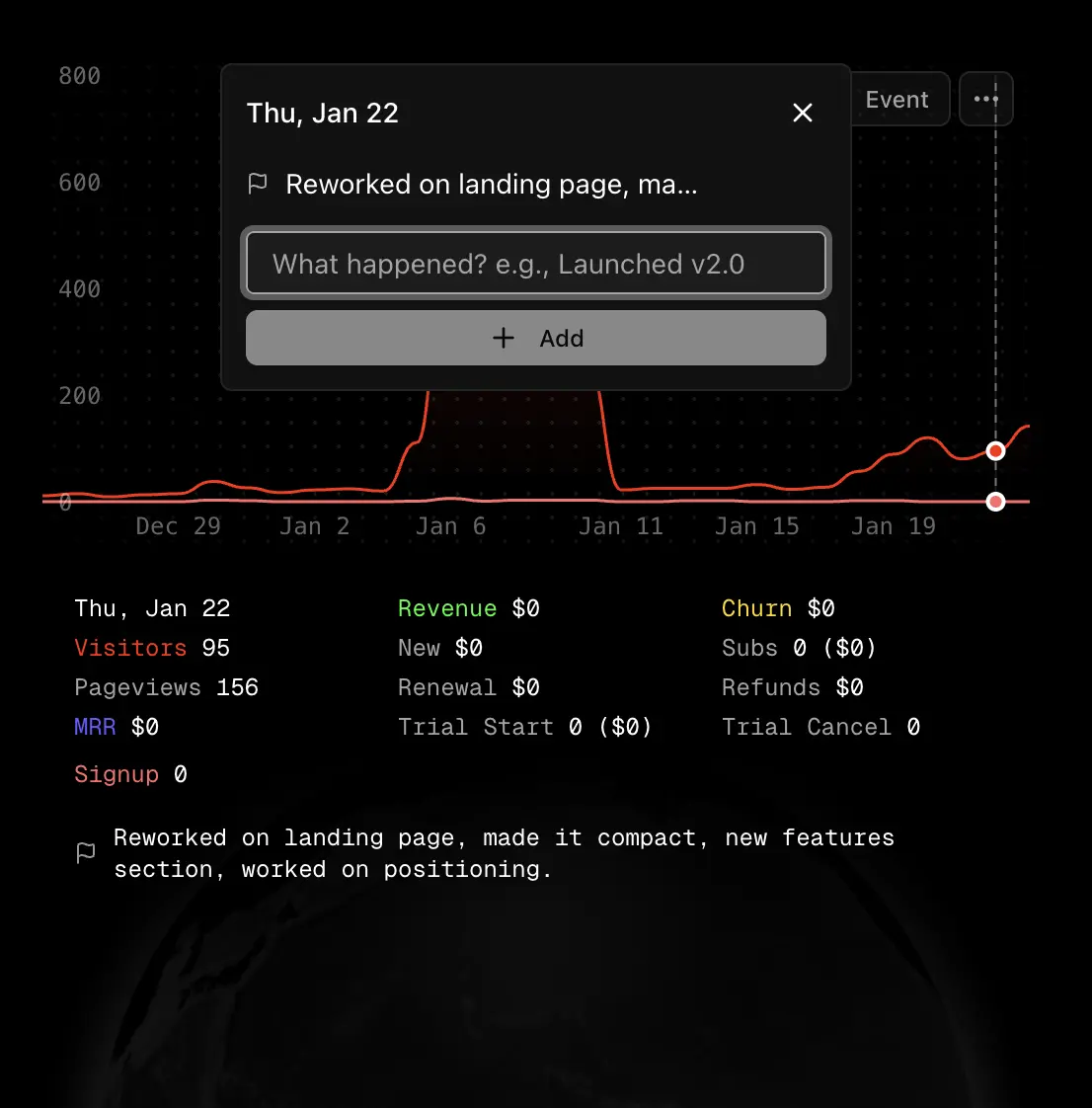
Chart Annotations

Add annotations to your trends chart to correlate external events with your analytics data.

  • Click anywhere on the chart to add an annotation for that date
  • Annotations appear as vertical dashed lines on the chart
  • Annotations API: create, update, delete, and list annotations programmatically via /v1/annotations

Chart Annotations

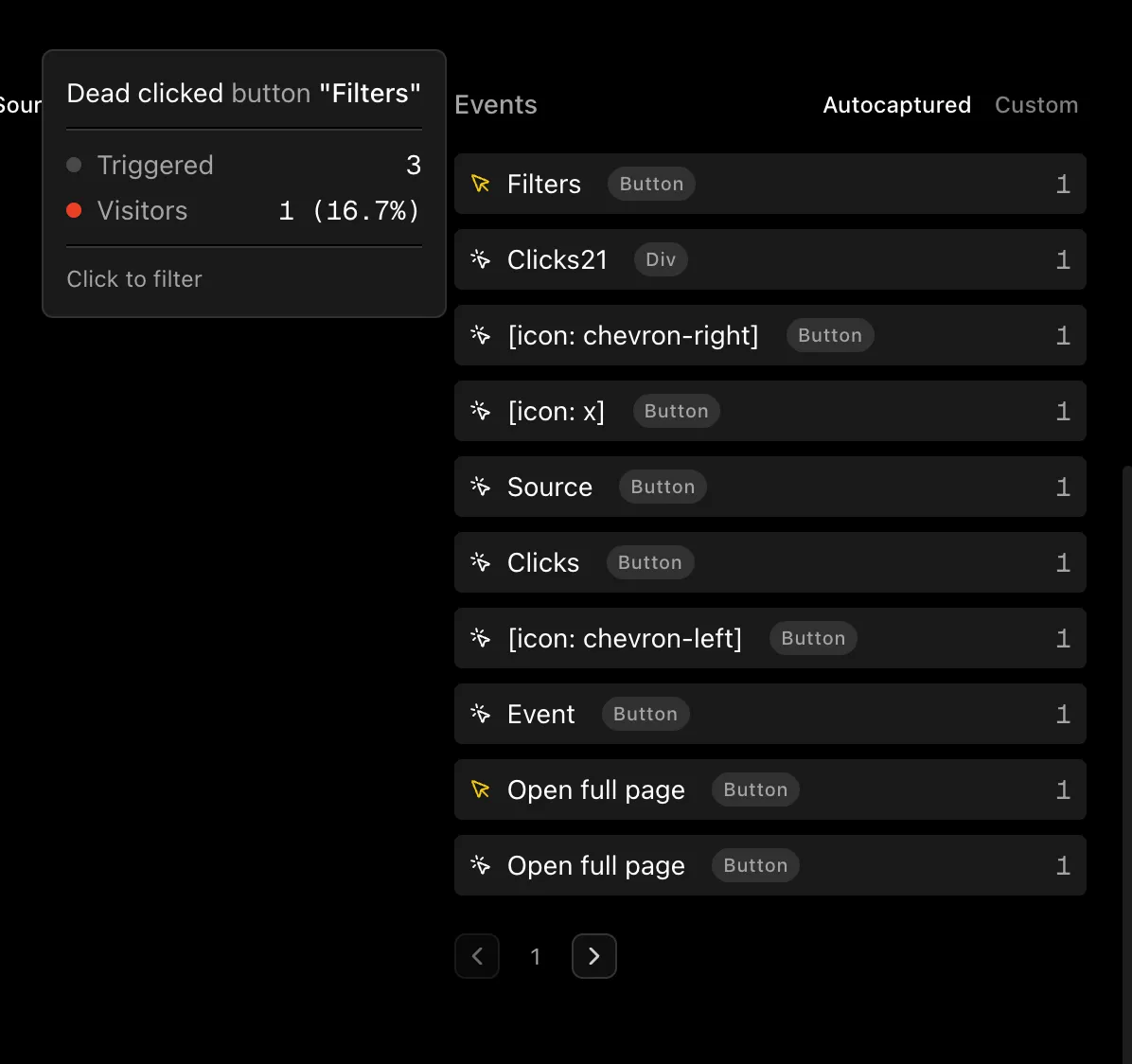
Autocapture

Automatically record user interactions without any additional code. The tracking script now detects UX issues and behavior patterns.

  • Clicks: Track all clicks on interactive elements
  • Rage clicks: Detect rapid repeated clicks indicating user frustration
  • Dead clicks: Identify clicks on elements that don't trigger any action
  • Form submissions: Know when users complete forms
  • Form abandonment: See when users start forms but leave without submitting
  • Media play: Track video and audio playback

Autocapture events are free and don't count toward your monthly quota.

Autocapture events in the dashboard

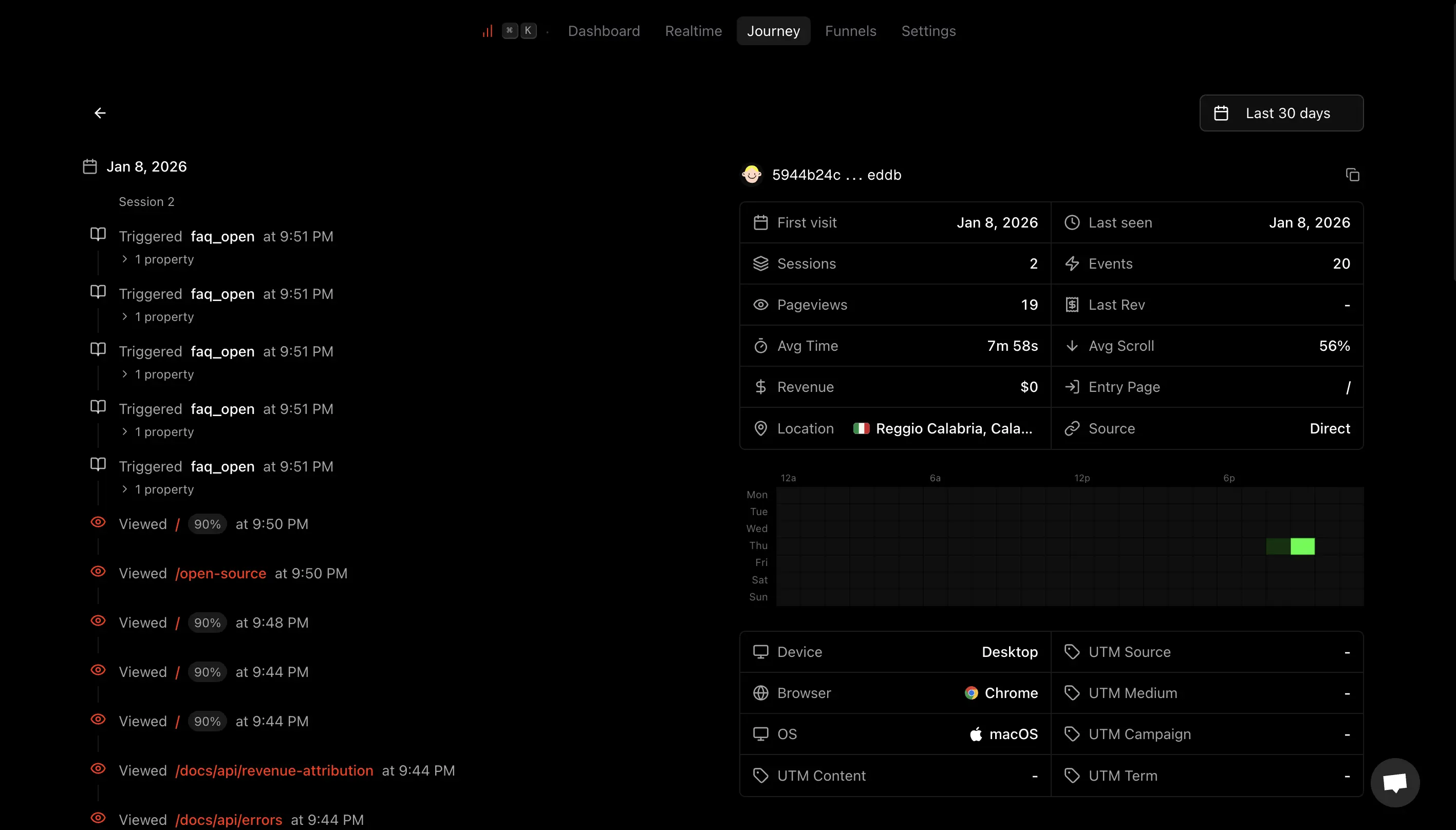
Visitor Journey

Track individual visitor journeys with a detailed timeline of every interaction.

  • Browse all visitors with pageviews, sessions, revenue, and source data
  • Filter by revenue-only to focus on paying customers
  • View visitor activity timeline like every pageview, custom event, and revenue
  • Quick drawer preview or full-page detailed view

Journey details page showing visitor timeline

Cookie Mode

Choose between privacy-first cookie-less tracking or cookie-based persistent visitor tracking per website.

  • Privacy Mode (default): Cookie-less tracking with daily-rotating visitor IDs, no consent banner needed
  • Cookie Mode: Persistent visitor IDs via first-party cookie for accurate returning visitor data
  • Automatic EU detection: EU visitors fall back to privacy mode unless they consent
  • Consent API: Integrate with your consent banner via supalytics.setConsent()
  • Configure per website in Settings → Tracking Mode

Non-EU visitors get cookies automatically. EU visitors stay in privacy mode unless you add consent integration.
Overlay Custom Events on Charts

Add custom event lines to the trends chart to spot patterns and correlations.

  • Click "+ Add event" to overlay up to 4 custom events with auto-assigned colors
  • Toggle visibility for each event line
  • Hover to see event counts at any point in time

Fix Dashboard Filters Not Applying to Events

Fixed a bug where dashboard filters weren't being applied to event data.

  • Event breakdown card now respects all active filters
  • Event trend lines on chart now reflect filtered data

Personal Access Tokens

  • Create API keys in Settings with scoped permissions
  • Use for server-side events, revenue tracking, or querying analytics

Shareable Analytics Dashboard

  • Toggle public sharing in Settings to get a shareable link
  • Anyone with the link can view your dashboard

Realtime Dashboard

  • Live visitors displayed on a 3D globe
  • Sidebar with country, page, and referrer breakdown

Duplicate and Save As New Views

More ways to manage your saved views.

  • Duplicate any saved view from the dropdown menu
  • "Save as new" option when you modify filters on a saved view
  • Smoother view switching with instant activation

Saved Views

Save your frequently used filter combinations as named views.

  • Create views from any filter combination
  • Switch between views using tabs above the dashboard
  • Set a default view that loads automatically
  • Share views via URL

Test Mode

Test your tracking implementation locally before deploying to production.

  • Toggle between Live and Test mode in the dashboard navbar
  • Test mode shows only localhost/127.0.0.1 data
  • CLI supports --test flag to query test data

Also in this release: CLI now supports browser-based login (supalytics login) and quick setup (supalytics init).

Command Line Interface

New CLI for power users who live in the terminal.

  • Quick stats, realtime visitors, top pages/referrers/countries
  • Custom queries with any dimension/metric combo
  • Friendly date ranges like today, yesterday, week, month

View CLI docs

Events API

New API endpoints to explore your custom events programmatically.

  • GET /v1/events - List all custom events with visitor counts
  • GET /v1/events/:name/properties - Discover property keys for an event
  • GET /v1/events/:name/properties/:key - Get breakdown of property values
  • Revenue attribution available with include_revenue flag
  • Filter any analytics query by event or event property

View API docs

Realtime API

New endpoint for realtime analytics data.

  • GET /v1/realtime - Get currently active visitors (last 2 minutes)
  • Returns active visitor count, top pages, countries, and referrers
  • Higher rate limit (30 req/min) for polling use cases

View API docs

UTM Content & Term Tracking

Full UTM parameter support in the dashboard.

  • Added utm_content and utm_term to UTM breakdown card
  • Access via "More" dropdown to keep the UI clean
  • Filter by any UTM parameter
  • Revenue attribution works with all UTM types

Affiliate Program

Earn money by sharing Supalytics with your audience.

  • 30% recurring commission on all payments from referred users
  • Unique referral link with ?ref=CODE tracking
  • Affiliate dashboard to track referrals, conversions, and earnings
  • $50 minimum payout via PayPal
  • Commission on renewals and plan upgrades forever

High Value Visitors

Identify your top revenue-generating visitor segments at a glance.

  • View top 3 highest-revenue visitors ranked by total spend
  • See which referrer, entry page, country, region, city, and UTM source drove each conversion
  • Switch between #1, #2, #3 tabs to compare top customers
  • Revenue figures shown alongside each dimension for quick insights

Toggle Chart Lines

Control which metrics appear in your trends chart.

  • Click Visitors, MRR, or Revenue stat cards to toggle their chart lines
  • Dimmed cards indicate hidden lines
  • Preferences saved in your browser for next visit
  • Hover over clickable stats to see the label highlight

MRR Tracking

Monitor revenue growth directly in your analytics dashboard.

  • MRR stat card showing current monthly recurring revenue
  • MRR trend line in the main analytics chart (click to toggle)
  • Daily automatic snapshots via Stripe integration
  • See revenue alongside pageviews in chart tooltips
  • Quick "Connect Stripe" link when integration not configured

Scroll Depth Tracking

Understand content engagement with automatic scroll depth tracking.

  • Scroll depth percentage shown in Pages breakdown tooltip
  • Tracks 25%, 50%, 75%, and 100% scroll milestones
  • Automatically enabled for all tracked pages
  • Identify pages where visitors drop off early

Click to Filter

Quickly drill down into your data with one click.

  • Click any item in breakdown cards (Pages, Referrers, Countries, etc.) to filter by that value
  • Hover shows percentage of visible items for both visitors and revenue
  • External link icon on Pages and Referrers to visit the page directly
  • "Click to filter" hint in tooltips

Exit Links Tracking

Track where your visitors go when they leave your site.

  • Automatic tracking of clicks on external links (no code changes needed)
  • New "Exit" tab in the Referrers card showing top exit destinations
  • Entry and Exit pages now have dedicated tabs in the Pages card
  • Entry pages include revenue attribution to see which landing pages convert best

Analytics API

New API endpoint to query your analytics data programmatically.

  • POST /v1/analytics endpoint for fetching pageviews, visitors, and other metrics
  • Flexible grouping by dimension (page, country, referrer, device, etc.)
  • Filter support with operators (is, contains, starts_with, etc.)
  • Revenue metrics available with include_revenue flag
  • API key authentication with analytics:read scope

View API docs

Revenue Attribution API

New API endpoint to track revenue from any payment provider.

  • POST /v1/payments endpoint for Paddle, Lemon Squeezy, or custom billing
  • API key authentication with granular payments:write scope

View API docs →

LLM-Friendly Documentation

Documentation is now optimized for AI assistants.

  • AI crawlers automatically receive markdown
  • Each doc page includes navigation links to all other docs

View LLM docs →

Server-Side Events API

Track events from your server when client-side tracking isn't available.

View API docs →

Custom Events

Track custom events beyond pageviews.

  • Use data-supalytics-e attribute for no-code tracking
  • Or call supalytics.trackEvent() from JavaScript
  • Add properties to events with data-supalytics-e-* attributes

Learn more →

Revenue Attribution

Connect your Stripe account to see revenue attributed to traffic sources.

  • Revenue breakdown by country, source, and UTM parameters
  • Privacy-focused: we only sync amounts, never customer details
  • Encrypted transaction IDs protect against data breaches

Learn more →

Exclude Your Own Visits

Two ways to exclude your own visits from analytics:

  • IP-based: Auto-detect your IP and block it across all your websites at once
  • Console-based: Run a command in your browser console to exclude your device

Settings Page Improvements

Moved the delete project option to the settings page for better organization. Cleaned up unused code throughout the dashboard.

Changes

  • Delete project relocated: Now found in the settings page instead of a separate location
  • Code cleanup: Removed unused code for better maintainability

Initial Release

The first release of Supalytics - simple, beautiful web analytics.

Core Features

  • Lightweight script: Under 1.5KB over the network
  • Pageviews & visitors: Track traffic and engagement
  • Session tracking: Duration and bounce rate metrics
  • Referrer tracking: See where visitors come from
  • UTM parameters: Track campaign performance
  • Geographic data: Country, region, and city breakdown
  • Device analytics: Browser, OS, and device type

Privacy First

  • No cookies required
  • GDPR compliant out of the box
  • All data stored in EU servers
  • No cross-site tracking

Filter by Events

Drill down into your analytics based on who triggered specific events.

  • Click any event in the Events card to filter by visitors who triggered that event
  • Click event properties in the detail dialog to filter by specific property values
  • Combine event filters with other filters (page, country, referrer, etc.)
  • See which pages, referrers, and devices your event-triggering visitors come from