---
title: CLI
description: Query analytics from terminal and AI agents
url: https://www.supalytics.co/docs/cli
---
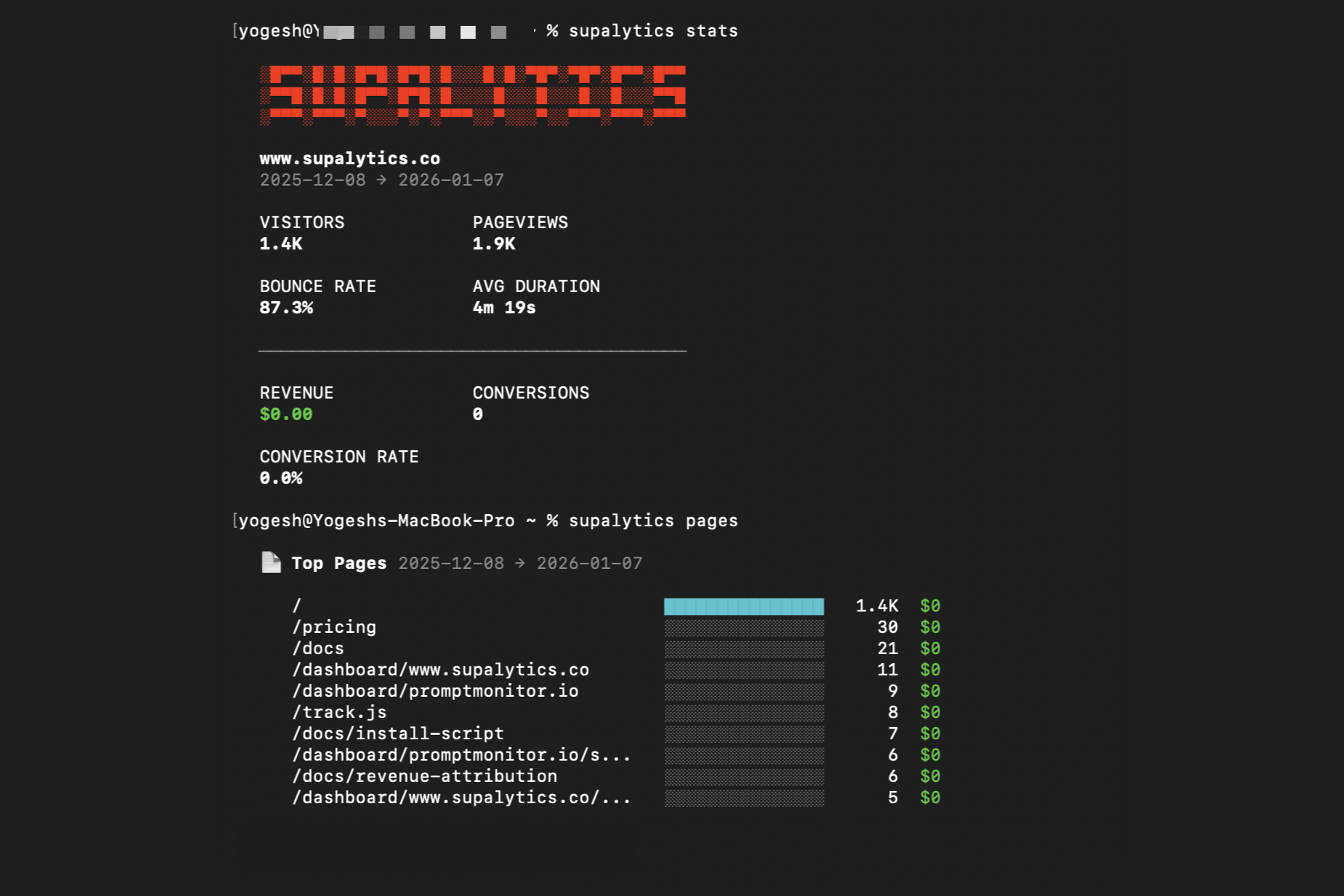
Query your analytics from the terminal. But the real power - AI agents can use it too.
Claude Code, Cursor, Clawdbot/Openclaw - they can now query your traffic data directly. Ask where visitors drop off, which pages convert, what referrers work best. Give your AI the data, let it help you improve. See [Agent Skills](/docs/skills) for setting it up on AI agents.
 ## Installation
Requires [Bun](https://bun.sh) runtime.
```bash
bun add -g @supalytics/cli
```
## Setup
### Quick Start
```bash
supalytics init
```
Opens browser to log in, creates your site, and gives you the tracking snippet. Done in 30 seconds.
### Manual Setup
```bash
supalytics login # Opens browser for authentication
supalytics sites add # Create a new site
```
### Re-authenticate
```bash
supalytics login --resync # Refresh token and sync sites
supalytics logout # Clear stored credentials
```
The CLI uses Personal Access Tokens (PATs) for authentication. Your token is stored locally and gives access to all your sites.
## Commands
### Stats
```bash
supalytics stats # Last 30 days (default)
supalytics stats today
supalytics stats yesterday
supalytics stats week
supalytics stats month
supalytics stats -a # Full dashboard: pages, referrers, countries, browsers, UTM, events
```
### Realtime
```bash
supalytics realtime # Current visitors
supalytics realtime --watch # Auto-refresh every 30s
```
### Breakdowns
```bash
supalytics pages # Top pages
supalytics referrers # Top referrers
supalytics countries # Traffic by country
```
### Custom Queries
```bash
supalytics query -d page -m visitors,revenue
supalytics query -d country,device -m visitors
supalytics query -d utm_source,utm_campaign -m visitors,revenue
```
### Trend
```bash
supalytics trend # Daily visitor chart
supalytics trend --compact # Sparkline view
```
### Events
```bash
supalytics events # List all events
supalytics events signup # Event stats + properties
supalytics events signup --property plan # Breakdown by property
```
### Annotations
```bash
supalytics annotations # List all annotations
supalytics annotations 90d # List annotations for last 90 days
supalytics annotations add 2025-01-15 "Product launch" # Add annotation
supalytics annotations remove # Remove annotation
```
### Journeys
```bash
supalytics journeys # List all visitors
supalytics journeys --customers # Only visitors with revenue
supalytics journeys --min-revenue 5000 # Filter by min revenue (cents)
supalytics journeys --sort-by revenue # Sort by revenue
supalytics journeys abc123xyz # View specific visitor timeline
```
## Options
All commands support:
* `-s, --site ` - Query a specific site
* `-t, --test` - Query localhost/test data instead of production
* `--json` - Output raw JSON
* `-f, --filter ` - Filter data (format: `field:operator:value`)
### Filter Examples
```bash
-f "country:is:US"
-f "page:contains:/blog"
-f "device:is:mobile"
```
## Site Management
```bash
supalytics sites # List all sites
supalytics sites add example.com # Create site with domain
supalytics sites add my-project # Or use any name, update later
supalytics sites update my-project -d example.com # Set the real domain
supalytics default example.com # Set default site
supalytics stats -s other.com # Query specific site
```
## Shell Completions
Tab completion for bash, zsh, and fish:
```bash
# Bash
supalytics completions bash >> ~/.bashrc
# Zsh
supalytics completions zsh >> ~/.zshrc
# Fish
supalytics completions fish > ~/.config/fish/completions/supalytics.fish
```
---
## Other Documentation
- [Autocapture](https://www.supalytics.co/llms/docs/autocapture)
- [Backfill Existing Subscriptions](https://www.supalytics.co/llms/docs/backfill-existing-subscriptions)
- [Block Your Own Traffic](https://www.supalytics.co/llms/docs/block-your-traffic)
- [Custom Events](https://www.supalytics.co/llms/docs/custom-events)
- [Features](https://www.supalytics.co/llms/docs/features)
- [Conversion Funnels](https://www.supalytics.co/llms/docs/funnels)
- [Introduction](https://www.supalytics.co/llms/docs)
- [Install Script](https://www.supalytics.co/llms/docs/install-script)
- [MRR Tracking](https://www.supalytics.co/llms/docs/mrr-tracking)
- [Revenue Attribution](https://www.supalytics.co/llms/docs/revenue-attribution)
- [Agent Skills](https://www.supalytics.co/llms/docs/skills)
- [Tracking Modes](https://www.supalytics.co/llms/docs/tracking-modes)
- [Visitor Journey](https://www.supalytics.co/llms/docs/visitor-journey)
- [Annotations](https://www.supalytics.co/llms/docs/api/annotations)
- [Error Codes](https://www.supalytics.co/llms/docs/api/errors)
- [Events (Read)](https://www.supalytics.co/llms/docs/api/events)
- [API Reference](https://www.supalytics.co/llms/docs/api)
- [Journeys](https://www.supalytics.co/llms/docs/api/journeys)
- [Query API](https://www.supalytics.co/llms/docs/api/query)
- [Realtime API](https://www.supalytics.co/llms/docs/api/realtime)
- [Revenue Attribution API](https://www.supalytics.co/llms/docs/api/revenue-attribution)
- [Events (Write)](https://www.supalytics.co/llms/docs/api/server-side-events)
## Installation
Requires [Bun](https://bun.sh) runtime.
```bash
bun add -g @supalytics/cli
```
## Setup
### Quick Start
```bash
supalytics init
```
Opens browser to log in, creates your site, and gives you the tracking snippet. Done in 30 seconds.
### Manual Setup
```bash
supalytics login # Opens browser for authentication
supalytics sites add # Create a new site
```
### Re-authenticate
```bash
supalytics login --resync # Refresh token and sync sites
supalytics logout # Clear stored credentials
```
The CLI uses Personal Access Tokens (PATs) for authentication. Your token is stored locally and gives access to all your sites.
## Commands
### Stats
```bash
supalytics stats # Last 30 days (default)
supalytics stats today
supalytics stats yesterday
supalytics stats week
supalytics stats month
supalytics stats -a # Full dashboard: pages, referrers, countries, browsers, UTM, events
```
### Realtime
```bash
supalytics realtime # Current visitors
supalytics realtime --watch # Auto-refresh every 30s
```
### Breakdowns
```bash
supalytics pages # Top pages
supalytics referrers # Top referrers
supalytics countries # Traffic by country
```
### Custom Queries
```bash
supalytics query -d page -m visitors,revenue
supalytics query -d country,device -m visitors
supalytics query -d utm_source,utm_campaign -m visitors,revenue
```
### Trend
```bash
supalytics trend # Daily visitor chart
supalytics trend --compact # Sparkline view
```
### Events
```bash
supalytics events # List all events
supalytics events signup # Event stats + properties
supalytics events signup --property plan # Breakdown by property
```
### Annotations
```bash
supalytics annotations # List all annotations
supalytics annotations 90d # List annotations for last 90 days
supalytics annotations add 2025-01-15 "Product launch" # Add annotation
supalytics annotations remove # Remove annotation
```
### Journeys
```bash
supalytics journeys # List all visitors
supalytics journeys --customers # Only visitors with revenue
supalytics journeys --min-revenue 5000 # Filter by min revenue (cents)
supalytics journeys --sort-by revenue # Sort by revenue
supalytics journeys abc123xyz # View specific visitor timeline
```
## Options
All commands support:
* `-s, --site ` - Query a specific site
* `-t, --test` - Query localhost/test data instead of production
* `--json` - Output raw JSON
* `-f, --filter ` - Filter data (format: `field:operator:value`)
### Filter Examples
```bash
-f "country:is:US"
-f "page:contains:/blog"
-f "device:is:mobile"
```
## Site Management
```bash
supalytics sites # List all sites
supalytics sites add example.com # Create site with domain
supalytics sites add my-project # Or use any name, update later
supalytics sites update my-project -d example.com # Set the real domain
supalytics default example.com # Set default site
supalytics stats -s other.com # Query specific site
```
## Shell Completions
Tab completion for bash, zsh, and fish:
```bash
# Bash
supalytics completions bash >> ~/.bashrc
# Zsh
supalytics completions zsh >> ~/.zshrc
# Fish
supalytics completions fish > ~/.config/fish/completions/supalytics.fish
```
---
## Other Documentation
- [Autocapture](https://www.supalytics.co/llms/docs/autocapture)
- [Backfill Existing Subscriptions](https://www.supalytics.co/llms/docs/backfill-existing-subscriptions)
- [Block Your Own Traffic](https://www.supalytics.co/llms/docs/block-your-traffic)
- [Custom Events](https://www.supalytics.co/llms/docs/custom-events)
- [Features](https://www.supalytics.co/llms/docs/features)
- [Conversion Funnels](https://www.supalytics.co/llms/docs/funnels)
- [Introduction](https://www.supalytics.co/llms/docs)
- [Install Script](https://www.supalytics.co/llms/docs/install-script)
- [MRR Tracking](https://www.supalytics.co/llms/docs/mrr-tracking)
- [Revenue Attribution](https://www.supalytics.co/llms/docs/revenue-attribution)
- [Agent Skills](https://www.supalytics.co/llms/docs/skills)
- [Tracking Modes](https://www.supalytics.co/llms/docs/tracking-modes)
- [Visitor Journey](https://www.supalytics.co/llms/docs/visitor-journey)
- [Annotations](https://www.supalytics.co/llms/docs/api/annotations)
- [Error Codes](https://www.supalytics.co/llms/docs/api/errors)
- [Events (Read)](https://www.supalytics.co/llms/docs/api/events)
- [API Reference](https://www.supalytics.co/llms/docs/api)
- [Journeys](https://www.supalytics.co/llms/docs/api/journeys)
- [Query API](https://www.supalytics.co/llms/docs/api/query)
- [Realtime API](https://www.supalytics.co/llms/docs/api/realtime)
- [Revenue Attribution API](https://www.supalytics.co/llms/docs/api/revenue-attribution)
- [Events (Write)](https://www.supalytics.co/llms/docs/api/server-side-events)