---
title: Install Script
description: Add the Supalytics tracking script to your website in under a minute
url: https://www.supalytics.co/docs/install-script
---
Add a single script tag to your website and start tracking immediately.
## Quick Start
Add this snippet to your `` tag:
```html
```
Replace `YOUR_SITE_ID` with your site ID from your project settings.
## Finding Your Site ID
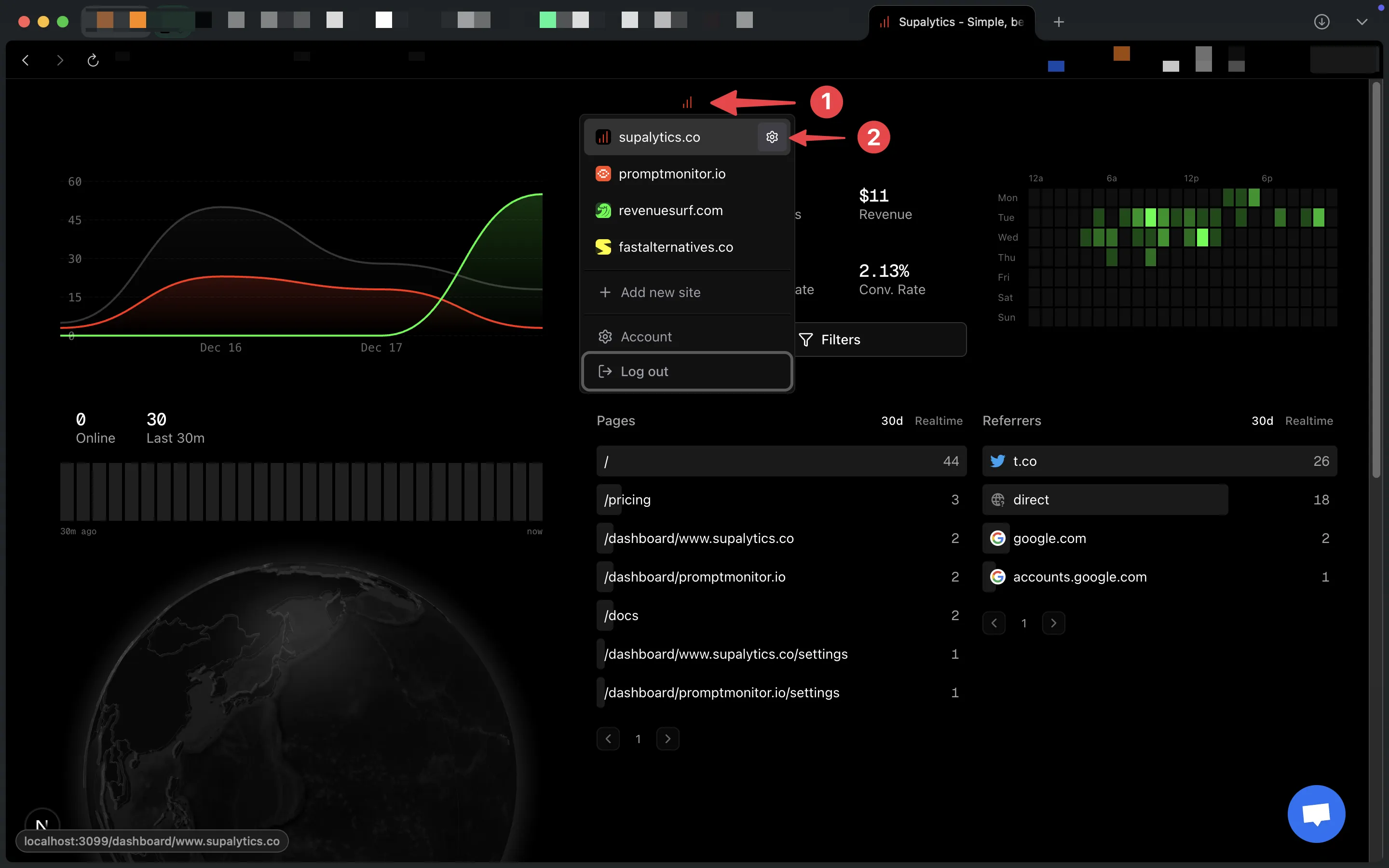
1. Hover over your website in the dashboard and click the settings icon
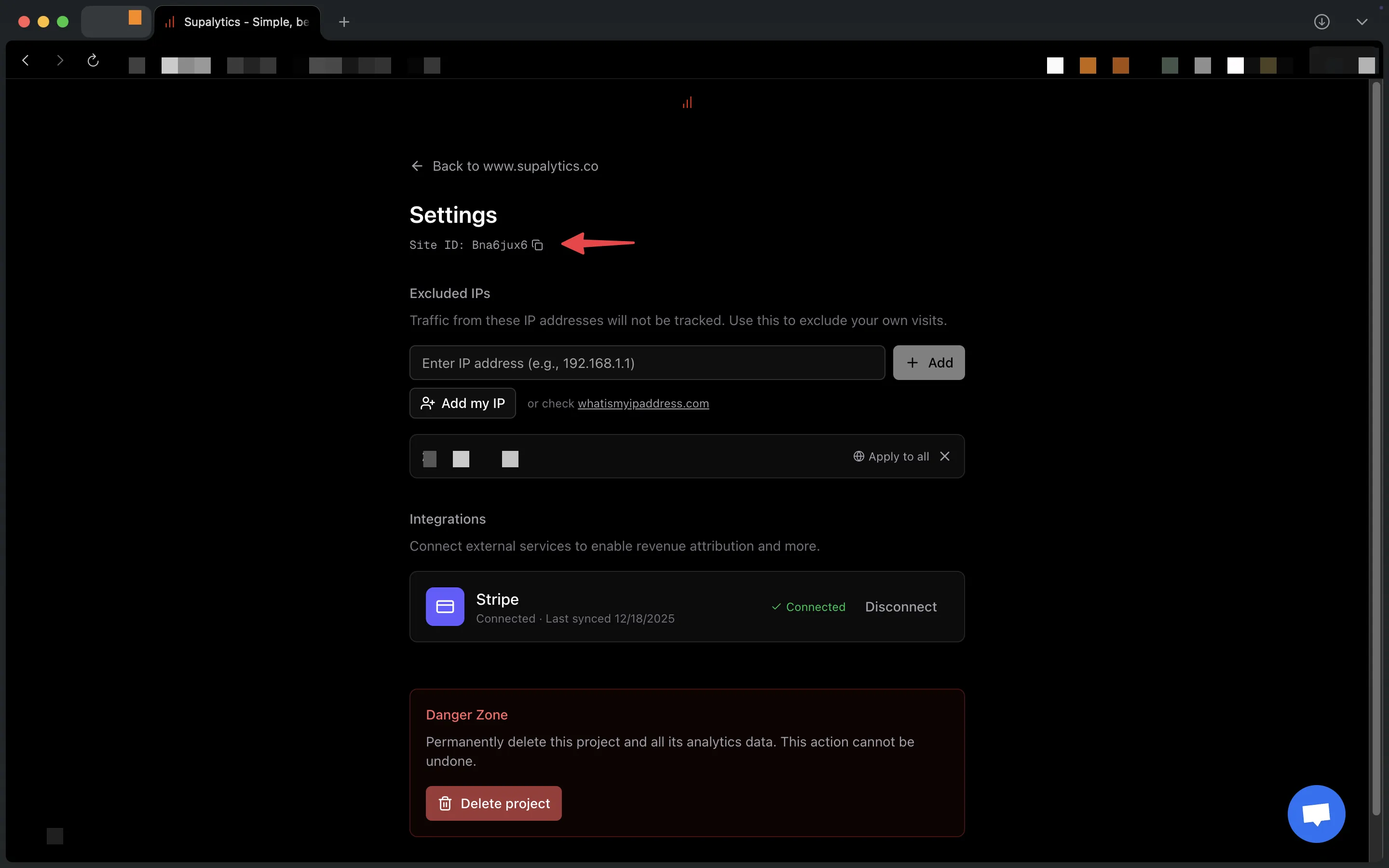
 2. Copy the Site ID from the settings page
 ## Script Attributes
| Attribute | Required | Description |
| ----------- | ----------- | ----------------------------------------------- |
| `data-site` | Yes | Your unique site ID (found in project settings) |
| `defer` | Recommended | Loads script without blocking page render |
## Verify Installation
1. Deploy your changes
2. Visit your site
3. Check the dashboard - pageviews appear within seconds
## Script Size
The tracking script is **\< 1.5KB** over the network. It won't slow down your site.
---
## Other Documentation
- [Autocapture](https://www.supalytics.co/llms/docs/autocapture)
- [Backfill Existing Subscriptions](https://www.supalytics.co/llms/docs/backfill-existing-subscriptions)
- [Block Your Own Traffic](https://www.supalytics.co/llms/docs/block-your-traffic)
- [CLI](https://www.supalytics.co/llms/docs/cli)
- [Custom Events](https://www.supalytics.co/llms/docs/custom-events)
- [Features](https://www.supalytics.co/llms/docs/features)
- [Conversion Funnels](https://www.supalytics.co/llms/docs/funnels)
- [Introduction](https://www.supalytics.co/llms/docs)
- [MRR Tracking](https://www.supalytics.co/llms/docs/mrr-tracking)
- [Revenue Attribution](https://www.supalytics.co/llms/docs/revenue-attribution)
- [Agent Skills](https://www.supalytics.co/llms/docs/skills)
- [Tracking Modes](https://www.supalytics.co/llms/docs/tracking-modes)
- [Visitor Journey](https://www.supalytics.co/llms/docs/visitor-journey)
- [Annotations](https://www.supalytics.co/llms/docs/api/annotations)
- [Error Codes](https://www.supalytics.co/llms/docs/api/errors)
- [Events (Read)](https://www.supalytics.co/llms/docs/api/events)
- [API Reference](https://www.supalytics.co/llms/docs/api)
- [Journeys](https://www.supalytics.co/llms/docs/api/journeys)
- [Query API](https://www.supalytics.co/llms/docs/api/query)
- [Realtime API](https://www.supalytics.co/llms/docs/api/realtime)
- [Revenue Attribution API](https://www.supalytics.co/llms/docs/api/revenue-attribution)
- [Events (Write)](https://www.supalytics.co/llms/docs/api/server-side-events)
## Script Attributes
| Attribute | Required | Description |
| ----------- | ----------- | ----------------------------------------------- |
| `data-site` | Yes | Your unique site ID (found in project settings) |
| `defer` | Recommended | Loads script without blocking page render |
## Verify Installation
1. Deploy your changes
2. Visit your site
3. Check the dashboard - pageviews appear within seconds
## Script Size
The tracking script is **\< 1.5KB** over the network. It won't slow down your site.
---
## Other Documentation
- [Autocapture](https://www.supalytics.co/llms/docs/autocapture)
- [Backfill Existing Subscriptions](https://www.supalytics.co/llms/docs/backfill-existing-subscriptions)
- [Block Your Own Traffic](https://www.supalytics.co/llms/docs/block-your-traffic)
- [CLI](https://www.supalytics.co/llms/docs/cli)
- [Custom Events](https://www.supalytics.co/llms/docs/custom-events)
- [Features](https://www.supalytics.co/llms/docs/features)
- [Conversion Funnels](https://www.supalytics.co/llms/docs/funnels)
- [Introduction](https://www.supalytics.co/llms/docs)
- [MRR Tracking](https://www.supalytics.co/llms/docs/mrr-tracking)
- [Revenue Attribution](https://www.supalytics.co/llms/docs/revenue-attribution)
- [Agent Skills](https://www.supalytics.co/llms/docs/skills)
- [Tracking Modes](https://www.supalytics.co/llms/docs/tracking-modes)
- [Visitor Journey](https://www.supalytics.co/llms/docs/visitor-journey)
- [Annotations](https://www.supalytics.co/llms/docs/api/annotations)
- [Error Codes](https://www.supalytics.co/llms/docs/api/errors)
- [Events (Read)](https://www.supalytics.co/llms/docs/api/events)
- [API Reference](https://www.supalytics.co/llms/docs/api)
- [Journeys](https://www.supalytics.co/llms/docs/api/journeys)
- [Query API](https://www.supalytics.co/llms/docs/api/query)
- [Realtime API](https://www.supalytics.co/llms/docs/api/realtime)
- [Revenue Attribution API](https://www.supalytics.co/llms/docs/api/revenue-attribution)
- [Events (Write)](https://www.supalytics.co/llms/docs/api/server-side-events)